It's never the umbrella that can get out of the rainy season, but the one who is not afraid of the wind and rain.
能走出雨季的从来不是雨伞,而是不惧风雨的自己。
Updated time: 03/05 2026.
VS code
Shift whole left: shift + Tab
Right: Tab
Batch annotation: Ctrl + K + C
Cancel: Ctrl + K + U
COMMAND: Ctrl + Shift + P
Global Search: Ctrl+T
jump to function definition: F12
vs code 左侧工具栏自带全局 search
Ctrl+Shift+O 当前文件大纲
左侧工具栏自带的OUTLINE也可以查看当前文件大纲更方便
# VS Code 全局搜索快捷键大全
## 1. 核心全局搜索快捷键
| 快捷键 (Windows/Linux) | 快捷键 (Mac) | 功能描述 | 适用场景 |
|-----------------------|-------------|---------|---------|
| `Ctrl+T` | `Cmd+T` | 搜索**工作区所有符号**(函数名、类名、变量等) | 快速跳转到定义 |
| `Ctrl+P` | `Cmd+P` | 搜索**文件名** | 快速打开文件 |
| `Ctrl+Shift+F` | `Cmd+Shift+F` | 全局**文本搜索**(文件内容) | 搜索代码片段 |
| `Ctrl+Shift+P` | `Cmd+Shift+P` | 搜索**命令面板**(所有可执行命令) | 执行VS Code操作 |
## 2. 符号(Symbol)精准搜索技巧
在 `Ctrl+T`/`Cmd+T` 符号搜索中:
- **`#` + 符号名**:搜索当前文件的符号(等价于 `Ctrl+Shift+O`)
- **`@` + 符号名**:在已打开的文件中搜索符号(TypeScript/JavaScript专用)
- **`:` + 行号**:跳转到指定行(如 `:120`)

## 3. 进阶搜索组合技
| 快捷键 (Windows/Linux) | 快捷键 (Mac) | 功能描述 |
|-----------------------|-------------|---------|
| `Ctrl+Shift+O` | `Cmd+Shift+O` | 当前文件的**大纲视图** |
| `F12` 或 `Ctrl+Click` | `F12` 或 `Cmd+Click` | 跳转到定义 |
| `Ctrl+Shift+.` | `Cmd+Shift+.` | 跳转到下一个符号 |
| `Ctrl+Shift+,` | `Cmd+Shift+,` | 跳转到上一个符号 |
## 4. 搜索范围控制技巧
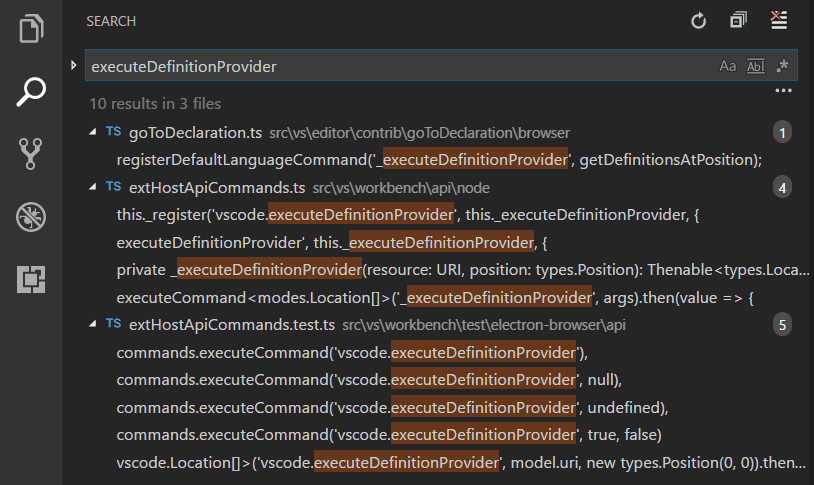
在全局文本搜索 (`Ctrl+Shift+F`/`Cmd+Shift+F`) 中:
- **`↑`/`↓`**:在搜索结果间导航
- **`*`**:通配符匹配(如 `*.py` 只搜Python文件)
- **`🔍`图标**:展开高级选项(支持正则表达式、排除文件夹等)
## 5. 实用场景示例
1. **快速找到函数定义**
- 按下 `Ctrl+T`/`Cmd+T` → 输入 `move_atoms` → 直接跳转定义文件
2. **全局替换变量名**
- `Ctrl+Shift+F`/`Cmd+Shift+F` → 输入旧变量名 → 点击替换 → 输入新变量名
3. **批量修改API调用**
- 开启正则模式 → 搜索 `old_function\((.*?)\)` → 替换为 `new_function($1)`
## 6. 推荐扩展增强
| 扩展名称 | 功能 |
|---------|------|
| **GitLens** | 在搜索结果中显示Git历史 |
| **Todo Tree** | 全局搜索TODO/FIXME注释 |
| **REST Client** | 全局搜索API端点 |
OUTLOOK
Emoij: Windows + Dot
Python3
基础命令
python3 -m venv /path/name
pip config set global.index-url https://pypi.tuna.tsinghua.edu.cn/simple

1、添加源
比如添加清华源https://pypi.tuna.tsinghua.edu.cn/simple:

pip config set global.index-url https://pypi.tuna.tsinghua.edu.cn/simple
如果set多次,似乎只能保存最后一次set的镜像源。

2、删除源
pip config unset global.index-url

3、查看现在用的哪个源
pip config list
Python 类型注解速查
本文档总结了 Python 类型注解中常用的类型及其来源,帮助你快速决定何时需要 from typing import ...,何时可以直接使用内置类型。
1. 基本内置类型(永远可直接使用)
| 类型 | 描述 | 示例 |
|---|---|---|
int |
整数 | def func(x: int) -> int |
float |
浮点数 | def func(x: float) -> str |
str |
字符串 | name: str = "Alice" |
bool |
布尔值 | flag: bool = True |
bytes |
字节串 | data: bytes = b"hello" |
None |
空类型 | def func() -> None |
这些类型是 Python 的内置类型,无需导入,直接作为注解使用。
2. 容器类型(根据 Python 版本决定来源)
2.1 Python 3.9+(包括 3.10、3.11 等)
内置容器类型直接支持泛型语法(即下标指定元素类型),无需从 typing 导入。
| 内置类型 | 示例注解 | 说明 |
|---|---|---|
list |
list[int] |
元素为整数的列表 |
tuple |
tuple[str, float] |
固定长度元组,两个元素 |
tuple[int, ...] |
可变长度元组,所有元素为整数 | |
dict |
dict[str, int] |
键为字符串,值为整数的字典 |
set |
set[float] |
元素为浮点数的集合 |
frozenset |
frozenset[bool] |
元素为布尔值的冻结集合 |
2.2 Python 3.5 ~ 3.8(旧版本)
需要使用 typing 模块中的对应类型:
python
from typing import List, Tuple, Dict, Set, FrozenSet

# 示例
names: List[str] = ["Alice", "Bob"]
point: Tuple[float, float] = (1.2, 3.4)
data: Dict[str, int] = {"key": 42}
unique: Set[int] = {1, 2, 3}
frozen: FrozenSet[bool] = frozenset([True, False])
注意:即使你使用 Python 3.9+,为了兼容旧版本,有时仍会看到导入写法。
3. 特殊类型(始终需要从 typing 导入)
这些类型是类型系统提供的辅助工具,必须从 typing 导入(除非在 Python 3.10+ 使用 | 替代部分功能)。
| 类型 | 描述 | 示例 | 替代写法(Python 3.10+) |
|---|---|---|---|
Union |
联合类型,表示可以是几种类型之一 | Union[int, str] |
`int |
Optional |
可选类型,等价于 Union[X, None] |
Optional[float] |
`float |
Any |
任意类型,关闭类型检查 | Any |
无 |
Callable |
可调用对象(函数、方法等) | Callable[[int, int], int] |
无 |
Iterable |
可迭代对象 | Iterable[int] |
无 |
Iterator |
迭代器 | Iterator[str] |
无 |
Generator |
生成器 | Generator[int, None, None] |
无 |
Sequence |
序列(如 list, tuple 等) |
Sequence[float] |
无 |
Mapping |
映射(如 dict) |
Mapping[str, int] |
无 |
TypeVar |
类型变量,用于泛型 | T = TypeVar('T') |
无 |
Generic |
泛型基类 | class Stack(Generic[T]): ... |
无 |
Literal |
限定为特定的字面值 | Literal["red", "green", "blue"] |
无 |
Final |
表示该变量不应被重新赋值 | Final[int] = 42 |
无 |
TypedDict |
具有固定键集的字典 | class Point(TypedDict): x: int; y: int |
无 |
注意:
Union和Optional在 Python 3.10+ 可以使用|运算符,但Any等仍需从typing导入。
4. 常见示例及写法演变
4.1 函数参数和返回值
# Python 3.8 及之前
from typing import Optional, Union, List

def greet(name: Optional[str] = None) -> Union[str, List[str]]:
    if name is None:
        return ["Hello", "World"]
    return f"Hello {name}"

# Python 3.10+
def greet(name: str | None = None) -> str | list[str]:
    if name is None:
        return ["Hello", "World"]
    return f"Hello {name}"
4.2 字典类型
# Python 3.8
from typing import Dict, Any
data: Dict[str, Any] = {"a": 1, "b": "text"}
python
# Python 3.9+
data: dict[str, Any] = {"a": 1, "b": "text"}
4.3 可选值
# Python 3.8
from typing import Optional
maybe_number: Optional[int] = None

# Python 3.10+
maybe_number: int | None = None
7. 类型注解的未来
- Python 3.10+:使用
|简化Union和Optional。 - Python 3.9+:内置容器支持泛型,无需导入
List等。 - Python 3.11+:
typing模块持续优化,部分类型标记为 deprecated,推荐使用内置版本或collections.abc。
8. 推荐实践
如果代码只需在 Python 3.10+ 运行,使用
|和内置容器泛型,减少导入。如果需要兼容 Python 3.8 及以下,保留
from typing import ...写法。对于复杂类型,可以使用类型别名提高可读性:
from typing import TypeAlias  # Python 3.10+
MyDict: TypeAlias = dict[str, list[int]]

# 表示一个坐标点
Point = tuple[float, float]  # Python 3.9+

# 表示一个矩阵(二维列表)
Matrix = list[list[float]]

# 表示一个可能为空的字符串列表
StringListOrNone = list[str] | None  # Python 3.10+

# 在函数中使用
def distance(p1: Point, p2: Point) -> float:
    ...

def transpose(m: Matrix) -> Matrix:
    ...

def get_names() -> StringListOrNone:
    ...
希望这份速查表能帮你快速确定类型注解的来源。如有遗漏或特定场景疑问,欢迎补充!
Anaconda
conda activate ...
conda env list
conda list -e > requirement.txt
conda create -n ... python=3.11
conda env remove -n ...

1、添加源
比如清华源:
conda config --add channels https://mirrors.tuna.tsinghua.edu.cn/anaconda/pkgs/free/
conda config --add channels https://mirrors.tuna.tsinghua.edu.cn/anaconda/pkgs/main/
conda config --set show_channel_urls yes
2、删除源
conda config --remove-key channels
3、查看现在用的是哪些源
conda config --show channels
也可以使用
conda config --show-sources
Linux
find
% find
% delete all files despite of 'relax.bash'
find . -type f ! -name 'relax.bash' -exec rm -f {} +
find . -type f ! \( -name 'POSCAR' -o -name 'INCAR' \) -print
find . -type f ! \( -name 'POSCAR' -o -name 'INCAR' -o -name 'POTCAR' \) -exec rm -f {} +
grep
% grep
% what line up and after around the line contained 'format'
grep -A 6 -B 6 'format' file
% grep energy
grep  without OUTCAR | tail -n 1
grep '  without' OUTCAR | tail -n 1  # 本人常用的是这个
grep sigma OUTCAR | tail -n 1
To see
% to see
diff file1 file2
more sub.vasp
cat sub.vasp
% to see the line number
cat -n filename.txt
% tail
tail -f slurm.txt
write to file
%create a file
cat > file.txt
Ctrl + D
% write content
echo ' ' >  file.txt
         >>              % append
chmod command
% for run script
chmod u+x sub.vasp
delete or add something on file
% delete specified line of the file
sed -i '10, 20d' filename.txt

% cat command
a = '$(cat POSCAR)'
echo '$a'

% add file to another file
sed -i 'N r tmp_file' filename.txt
% N - line

% delete file
rm -f /../../*.log

% delete directory
rm -rf /root/log/game
Unzip command
unzip .../*.zip
tar -zxvf .../*.tar.gz
cp command
% transfer the entirely directory
cp  -r /home/downloads/phpcms_v9_UTF8/install_package/ /opt/lampp/htdocs/
mv command
% move directory
mv ../../  ../
For internet
# all up
ip addr
# restart network
sudo systemctl restart networking
# if down, set up
sudo ip link set ens33 up
sudo dhclient ens33
Storage
lfs quota -uh $USER ~
Slurm
运行时间
| 目的 | 命令 |
|---|---|
| 查看历史任务时间 | sacct -j <job_id> |
| 正在运行任务时间 | squeue -j <job_id> |
| 总结资源使用率 | seff <job_id> |
| 日志文件末尾查看 | tail slurm-<jobid>.out |
| 自己记录时间 | start=$(date +%s) |
scontrol
scontrol show job 123456
sacct
sacct -j 37302670 --format=JobID,JobName,State,ExitCode,WorkDir,NodeList,Elapsed,ReqMem,MaxRSS
JobID:作业 ID
JobName:作业名称
State:作业状态(COMPLETED, FAILED, TIMEOUT 等)
ExitCode:退出代码(格式 0:0 表示正常退出)
WorkDir:工作目录
Submit:提交时间
Start:开始时间
End:结束时间
Elapsed:运行时长
NNodes:分配的节点数
NCPUS:分配的 CPU 核心数
ReqMem:请求的内存
MaxRSS:最大内存使用
AllocCPUS:分配的 CPU 数(与 NCPUS 类似)
NodeList:分配的节点列表
Partition:分区
Account:账户
UID:用户 ID
User:用户名
ReqCPUS:请求的 CPU 数
head, tail
# 末尾
tail -n 1
# 顶部
head -n 1
awk
awk '{print $1}'
sed
# get 120-line content
sed -n 120p slurm*.out
cut
cut -d: -f1
Git
# 配置Git用户信息
git config --global user.name "Your Name"  # 设置全局用户名
git config --global user.email "youremail@example.com"  # 设置全局邮箱地址
# SSH to cennected between git and github

# 初始化一个新的Git仓库
git init  # 在当前目录初始化新的Git仓库

# 克隆一个现有的仓库 # http / SSH (recommended)
git clone https://github.com/username/repository.git  # 克隆远程仓库到本地
git clone git@github.com:ShengLin1001/hetbuilder.git

# 查看状态
git status  # 查看当前工作目录和暂存区的状态

# 添加和提交更改
git add .  # 将所有修改和新文件添加到暂存区
git commit -m "Commit message"  # 提交暂存区到仓库区

# 推送更改到远程仓库
git push origin main  # 将本地的更改推送到远程仓库的main分支

# 更新你的本地仓库
git pull origin main  # 从远程仓库的main分支拉取最新更改并合并到本地

# 分支操作
git branch branchname  # 创建一个新分支
git checkout branchname  # 切换到指定分支
git merge branchname  # 将指定分支合并到当前分支

# 查看提交历史
git log  # 查看提交历史记录
alias
# see alias
git config --get-regexp alias

# 设置 'co' 为 'checkout' 的别名 git co branch-name
git config --global alias.co checkout

# 设置 'br' 为 'branch' 的别名
git config --global alias.br branch

# 设置 'ci' 为 'commit' 的别名
git config --global alias.ci commit

# 设置 'st' 为 'status' 的别名
git config --global alias.st status

# 设置 'lg' 为更美观的日志输出格式
git config --global alias.lg "log --graph --pretty=format:'%Cred%h%Creset -%C(yellow)%d%Creset %s %Cgreen(%cr) %C(bold blue)<%an>%Creset' --abbrev-commit"

# 设置 'unstage' 作为撤销暂存的别名
git config --global alias.unstage 'reset HEAD --'

# 设置 'last' 为查看最后一次提交的别名
git config --global alias.last 'log -1 HEAD'

# git ac ""
git config --global alias.ac '!git add -A && git commit -m'

# push and pull on main
git config --global alias.push 'push origin main'
git config --global alias.pull 'pull origin main'
Para
papp_cloud 是一个登录超算的命令行工具,具备ssh,scp,rsync, sftp, sshfs 等基础功能。

o 支持的操作系统

  - Linux x86_64/i686
  - Darwin x86_64

Flags:
  -h, --help     Show context-sensitive help (also try --help-long and --help-man).
  -V, --version  Show application version.
  -D, --debug    Enable debug mode.
  -s, --select   select a vpn link route.

Commands:
  help [<command>...]
    Show help.

  ssh [<flags>] <destination> [<command>...]
    Ssh is a sub command for logging into a remote machine and for executing commands on a remote machine.

    example:

      1. 使用paratera帐号登录广州超算(IPv4)

      $ papp_cloud ssh paratera@gz

      2. 使用paratera帐号登录广州超算(IPv6)

      $ papp_cloud ssh -6 paratera@gz


  sshfs [<flags>] <source ... target>...
    SSHFS - filesystem client based on SSH.

    example:


       1.挂载广州超算目录/home/paratera到本地挂载点/localdir

       $ papp_cloud sshfs paratera@gz:/home/paratera /localdir

  scp [<flags>] <source ... target>...
    Scp copies files between hosts on a network.

    example:

      o Upload

      1. 使用paratera帐号上传file1,file2文件到广州超算的paratera用户家目录(IPv4)

      $ papp_cloud scp file1 file2 paratera@gz:/home/paratera

      2. 使用paratera帐号上传file1,file2文件到广州超算的paratera用户家目录(IPv6)

      $ papp_cloud scp -6 file1 file2 paratera@gz:/home/paratera

      o Download

      1. 使用paratera帐号下载广州超算paratera用户家目录下的file1 文件到本地的/data
      目录(IPv4)

      $ papp_cloud scp paratera@gz:/home/paratera/file1 /data

      2. 使用paratera帐号下载广州超算paratera用户家目录下的file1 文件到本地的/data
      目录(IPv6)

      $ papp_cloud scp -6 paratera@gz:/home/paratera/file1 /data


  sftp [<flags>] <destination>...
    Sftp is a file transfer program, similar to ftp.

    example:

      1. 使用paratera帐号登录广州超算(IPv4)

      $ papp_cloud sftp paratera@gz

      2. 使用paratera帐号登录广州超算(IPv6)

      $ papp_cloud sftp -6 paratera@gz


  rsync [<flags>] <source ... target>...

    Rsync copies files either to or from a remote host, or locally on the current host (it does not support copying files between two remote hosts

    example:

      o Upload

      1. 使用paratera帐号同步file1,file2文件到广州超算的paratera用户家目录(IPv4)

      $ papp_cloud rsync file1 file2 paratera@gz:/home/paratera

      2. 使用paratera帐号同步file1,file2文件到广州超算的paratera用户家目录(IPv6)

      $ papp_cloud rsync -6 file1 file2 paratera@gz:/home/paratera

      o Download

      1. 使用paratera帐号下载广州超算paratera用户家目录下的file1 文件到本地的/data
      目录(IPv4)

      $ papp_cloud rsync paratera@gz:/home/paratera/file1 /data

      2. 使用paratera帐号下载广州超算paratera用户家目录下的file1 文件到本地的/data
      目录(IPv6)

      $ papp_cloud rsync -6 paratera@gz:/home/paratera/file1 /data

  login --user=USER --[no-]password
    Login paratera cloud service.

    example:

      $ papp_cloud login -u user@paratera.com -p

  logout
    Logout paratera cloud service.

    example:

      $ papp_cloud logout

  lsc
    list super computer centers.

  accounts
    list super computer center accounts
papp_cloud ssh scg6928@zc-m6
Please indicate the source when reprinting. Please verify the citation sources in the article and point out any errors or unclear expressions.